The dashboard on your phone
How to use the Okeh dashboard on your phone: the bottom bar, creating and sending documents, checking opens. An iPhone and Android app is on its way.
On this pageThe bottom bar
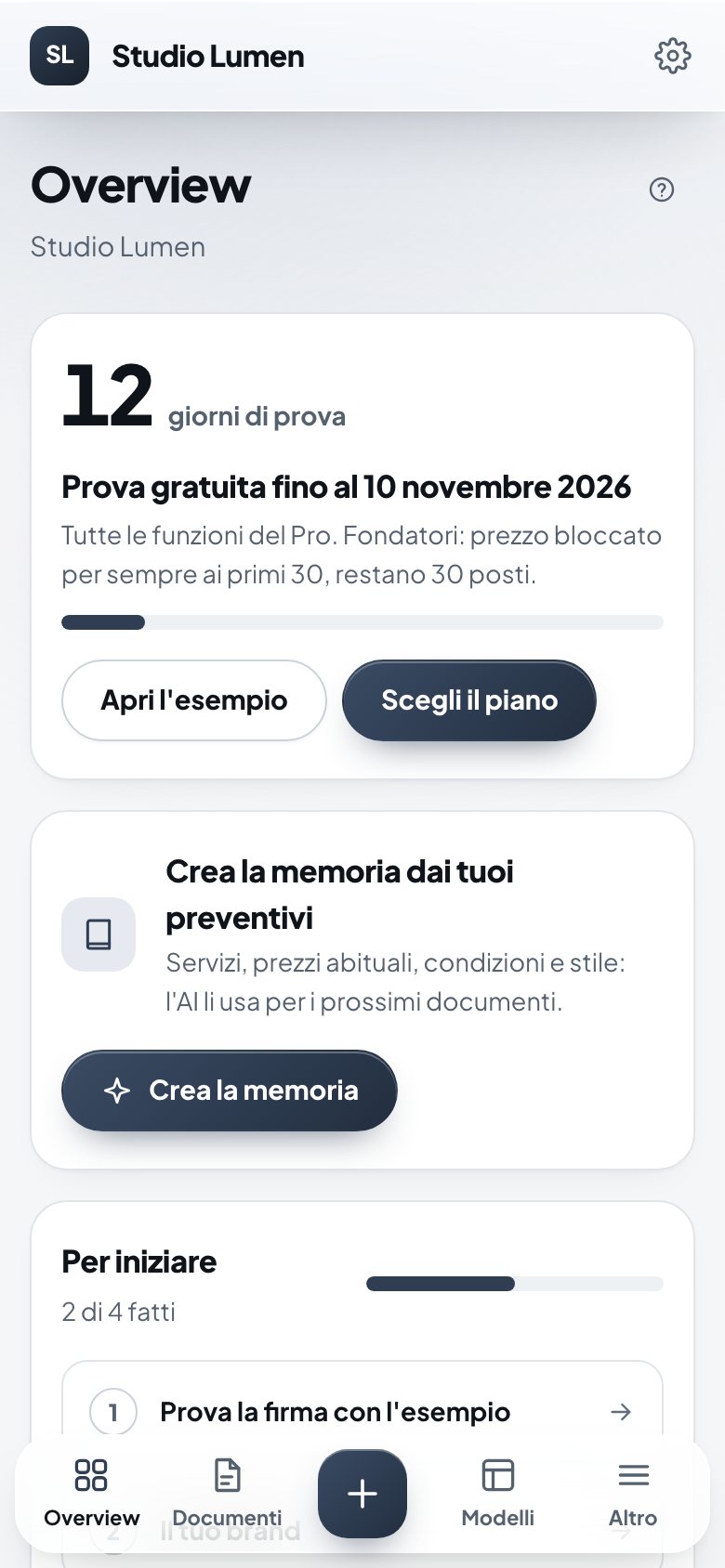
The dashboard works in your phone's browser, with the same features as on a computer. Open yourname.okeh.app/login and log in as usual.
The bottom bar
- Overview, Documenti (Documents) and Modelli (Templates), as on a computer.
- The + button opens Nuovo documento (New document): Carica un file (Upload a file), Da modello (From template) or Con AI (With AI).
- Altro (More) opens the menu with Crea con AI (Create with AI), Memoria AI (AI memory), Impostazioni (Settings), Abbonamento (Subscription), Guide (Guides) and Esci (Log out).
Adding it to your Home Screen
- iPhone: in Safari, press Share, then Add to Home Screen.
- Android: in Chrome, open the three-dot menu, then Add to Home screen.
The app
The Okeh app for iPhone and Android is on its way, with notifications when a client opens or signs. When it's in the stores, we'll say so here and in the dashboard.
Was this helpful?